
WRKLICINF - MDCC Product Identifier Feature code not showing
Problem:
Grace Period Expired Message returned when trying to log into the MDCC client.
When entering WRKLICINF for 8PLMCST or 5ATMAPL there are no feature codes showing. Users can't access ATM or MDCC client application.
Resolution:
- Verify WRKLICINF command is not showing any feature codes by entering the command
- Expected results for MDCC 8PLMCST product identifier
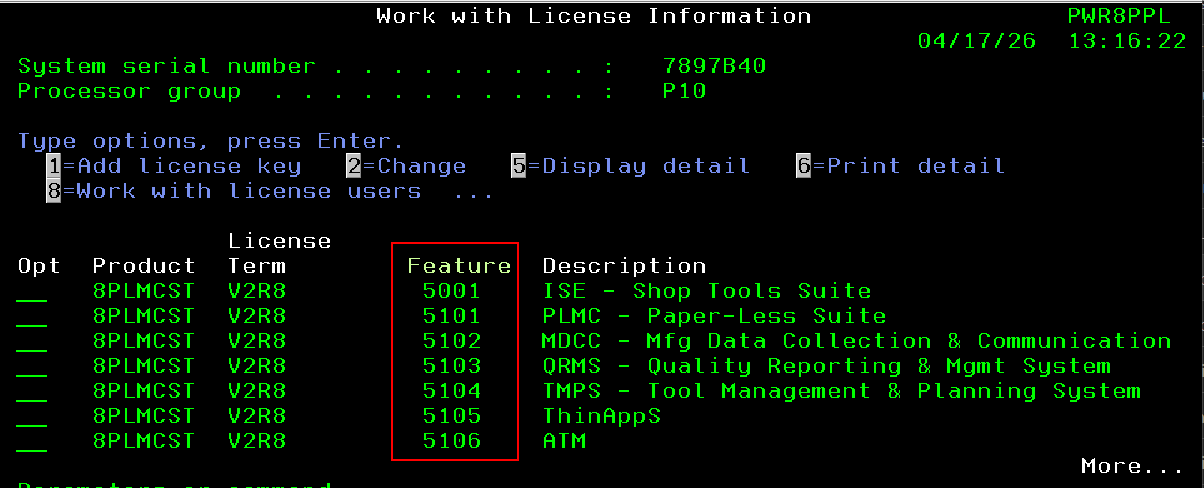
- If identifiers are showing as in the above screen shot do not continue the Product Identifier is not corrupted.
- Expected results for MDCC 8PLMCST product identifier
- Check to see the identifier exists -
- On a command line, type:
WRKOBJ OBJ(QGPL/ISEPRDxy) OBJTYPE(*PRDDFN)
– where x=2 and y = 6, 7, or 8 based on version of MDCC
- On a command line, type:
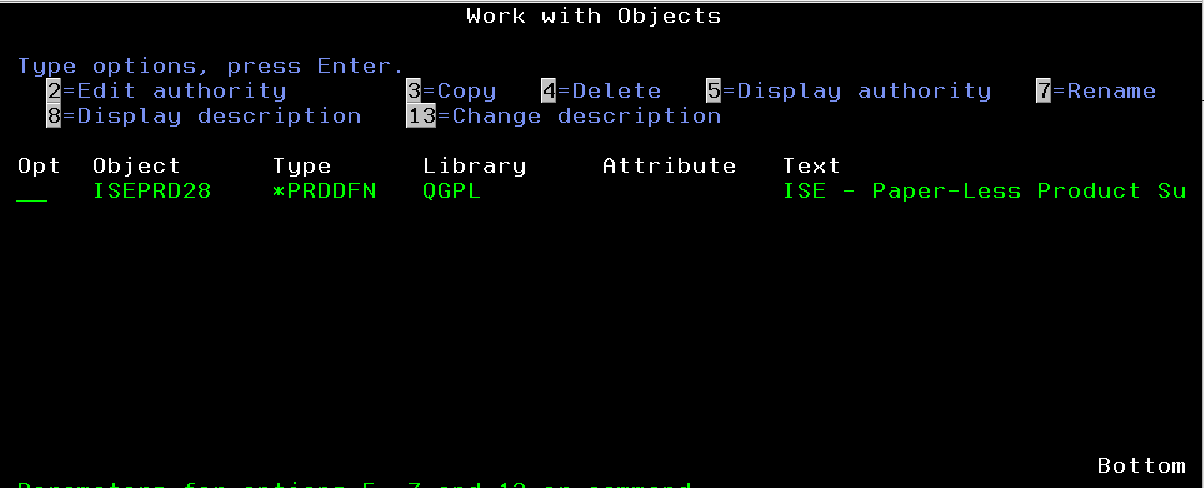 If it does exist, Delete the product Identifier by taking option4 to delete it from QGPL
- Once deleted proceed with restoring it from save file ISEPRDR8
- RSTOBJ OBJ(ISEPRD28) SAVLIB(QGPL) DEV(*SAVF) OBJTYPE(*PRDDFN)
SAVF(QGPL/ISEPRDR8) RSTLIB(QGPL)
o GRTOBJAUT OBJ(QGPL/ISEPRD28) OBJTYPE(*PRDDFN) USER(*PUBLIC) AUT(*ALL) –
where x=2 and y = 6, 7, or 8 based on version of MDCC
- RSTOBJ OBJ(ISEPRD28) SAVLIB(QGPL) DEV(*SAVF) OBJTYPE(*PRDDFN)
If you need the file it can be downloaded from the following link - ISEPRDR8.FILE
Proceed to Check the Product Definition Message File
On a command line, type:
WRKOBJ OBJ(QGPL/ISEPRDMSG8) OBJTYPE(*MSGF)
If it is not found, restore it from the save file and grant the object authority with
the following commands:
RSTOBJ OBJ(ISEPRDMSG8) SAVLIB(QGPL) DEV(*SAVF) OBJTYPE(*MSGF)
SAVF(QGPL/ISEPRDR8) RSTLIB(QGPL)
GRTOBJAUT OBJ(QGPL/ISEPRDMSG8) OBJTYPE(*MSGF) USER(*PUBLIC) AUT(*ALL)
If it is found, restore it from the save file to QTEMP and merge the message files
using the following commands:
RSTOBJ OBJ(ISEPRDMSG8) SAVLIB(QGPL) DEV(*SAVF) OBJTYPE(*MSGF)
SAVF(QGPL/ISEPRDR8) RSTLIB(QTEMP)
MRGMSGF FROMMSGF(QTEMP/ISEPRDMSG8) TOMSGF(QGPL/ISEPRDMSG8)
DLTMSGF MSGF(QTEMP/ISEPRDMSG8)
Test the WRKLICINF PRDID(8PLMCST) command again.
If feature codes exist Re-apply the MDCC License as needed.