
Overview
The goal of this article is to be the main landing page for troubleshooting any issues with MV2's integration with Business Central. Below you will find general topics with examples of issues you may encounter and links to Knowledge Base articles to assist in resolving those issues.
Table of Contents
- Data is missing in MV2
- Data is missing in Business Central
- Received an email titled "Provider API Error Notification"
Data is missing in MV2
This section is specific to data that is expected to be synchronized into MV2 from Business Central. Some examples of Business Central data missing in MV2 would be:
- A new RPO Line was created in Business Central
- Changes to an RPO Routing
There are two main validation processes that occur to determine whether data is synchronized into MV2
- Validation that occurs in the MV2 Business Central Extension
- The importing of the ERP data, which is referred to as the MV2 Bulk Load process.
MV2 Business Central Extension Validation
The MV2 Business Central Extension is software written by ISE that is installed into Business Central to monitor for data changes in Business Central and to relay those updates to MV2. For more information about the MV2 to Business Central integration and how the Extension is used, please see Summary of MV2's integration with Microsoft Dynamics 365 Business Central
When a user adds or updates data in Business Central, the MV2 extension will do some basic validation prior to synchronizing the data to MV2. The first step in diagnosing missing data in MV2 is to ensure that this validation has not failed. For details about the validation that occurs in the Extension, please see MV2 Business Central Extension - Data validation.
MV2 Bulk Load
The second phase of the Synchronization process is the importing of the ERP data into MV2, referred to as the Bulk Load process. The Bulk Load process is part of the MV2 product and is executed either during the Full Sync process or when data is modified in Business Central and the MV2 extension is monitoring for changes, which is referred to as the Mini Sync process. This validation involves ensuring that dependencies are met, for example, the Component on an RPO Line is a valid Item in MV2.
If it's determined that the MV2 Business Central Extension validation should have passed, the next step is to review the output of the Bulk Load process. This can be done via MV2's Log Viewer.
Link to the Log Viewer guide for Synchronization:
MV2 Log Viewer - Business Central to MV2 (Synchronization)
Data is missing in Business Central
This section is specific to data that is expected to be updated in Business Central based on transactions executed in MV2.
Some examples of MV2 not updating Business Central are:
- RPO updates done via MV2's Record Piece, Production Receipt, Issue Material, etc., yet the RPO's, or Journals, in Business Central do not reflect the transaction(s) executed.
The first step in determining what may have caused MV2 transaction data to fail to update Business Central is to review the Log entries. Once the Log has been reviewed and the error message from Business Central has been determined, review the specific details about that message and what caused it. The link below contains information about common errors returned by Business Central.
Link to the Log Viewer guide for Transactions:
MV2 Log Viewer - For MV2 to Business Central issues (Transactions)
Link to the list of common errors returned by Business Central and their causes:
Troubleshooting - MV2 Transactions - Common errors returned by Business Central
Received an email titled "Provider API Error Notification"
The Provider API is an MV2 application that is responsible for sending MV2 Transaction data to Business Central. If that process fails due to Business Central validation or a communications error, the Provider API will send an email to the configured email addresses.
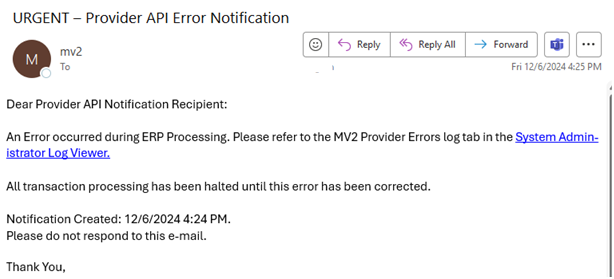
The receipt of this email indicates that MV2 is no longer attempting to send Transactional data to Business Central. The issue must be resolved in Business Central and user action must be taken in MV2 before MV2 transactions can continue processing.
The email instructs the recipient to refer to the 'Provider Errors' log in the MV2 Log Viewer and provides a link to the MV2 Log Viewer. Once the Log has been reviewed and the error message from Business Central has been determined, review the specific details about that message and what caused it. The link below contains information about common errors returned by Business Central.
Link to the list of common errors returned by Business Central and their causes:
Troubleshooting - MV2 Transactions - Common errors returned by Business Central
How do I configure who should get the email notifications?
Health status of the MV2 to Microsoft Dynamics 365 Business Central Integration